Wear, Calibrate, and Run Mocap
Roles and Mounting
One session selects exactly one wear_side: right or left. Bind IMUs to
chest, upper_arm, forearm, palm, and optional finger.
Upper-arm and forearm mounting does not require a perfect world-axis alignment; the body calibration estimates mounting alignment. It does require a rigid mount:
Fasten the IMU so it cannot rotate or slide during calibration and use.
Place upper-arm IMU around the middle of the upper arm, clear of shoulder and elbow joints. Place forearm IMU around the middle of the forearm, clear of elbow and wrist.
For repeatability, use the same visible orientation: board long edge toward the elbow on the upper arm and toward the wrist on the forearm.
Recalibrate after a material mounting-position or orientation change.
For palm and finger, mount local +X from wrist toward fingertips when possible. The straight-reference pose can then establish palm roll/pitch and the open finger reference consistently.
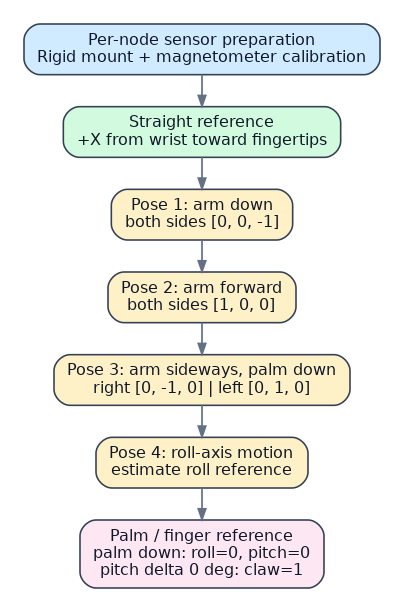
This is a calibration reference diagram, not a substitute for a real wearing
photo. The right/left sideways vectors are expressed in body_rh.
Calibration Sequence
First calibrate each individual IMU as a sensor, including magnetometer work when applicable. Then wear all IMUs and perform body calibration:
Step |
Both sides |
Right known direction |
Left known direction |
|---|---|---|---|
1 |
Arm naturally down |
|
|
2 |
Arm forward and level |
|
|
3 |
Arm sideways and level, palm down |
|
|
4 |
Roll-axis motion |
estimated from motion |
estimated from motion |
In the visualizer, press C to start/restart calibration and to begin each
pose capture. Static captures last 3 seconds; roll capture lasts 5 seconds.
The UI shows a countdown, sample count, quaternion angular standard deviation,
and variance. These are initial quality warnings, not hard gates.
Palm, Finger, and Claw
After the arm steps, keep upper arm, forearm, palm, and finger nearly collinear, with straight wrist/fingers and palm down:
palm down:
roll=0,pitch=0;palm left:
roll=+90 deg;palm forward:
pitch=-90 deg;finger-palm pitch delta of 0 degrees:
claw=1.
Optionally record a maximum-closed finger reference. Otherwise 120 degrees is
the default closed delta. Calibration is saved separately per side as
imu_body_calibration_right.json or imu_body_calibration_left.json; it
contains frame=body_rh, role IDs, and all calibration references.
Live and Replay
python3 SOFTWARE/人体动捕/mocap_viz.py --wear-side right
python3 SOFTWARE/人体动捕/mocap_viz.py --replay examples/demo_replay.jsonl
Replay uses the calibration snapshot embedded in JSONL by default. It exercises the same solver as live mode and is the required first diagnostic before external robot integration. See JSONL Recording and Replay.